
Inventory Transactions
In AgWare MGR, inventory is a farm product available for sale. It could also be used for inventories of materials used in production, such as seed, fertilizer, etc. Inventory items are identified by unique combinations of four data fields: Farm Code, Inventory Code, Location Code, and Production Year. Initial inventory setup is done in the Farm section under the Inventory Tab and then inventory changes are done in the Transaction section. The inventory code and location code are necessary fields for inventory and production maintenance through transactions.
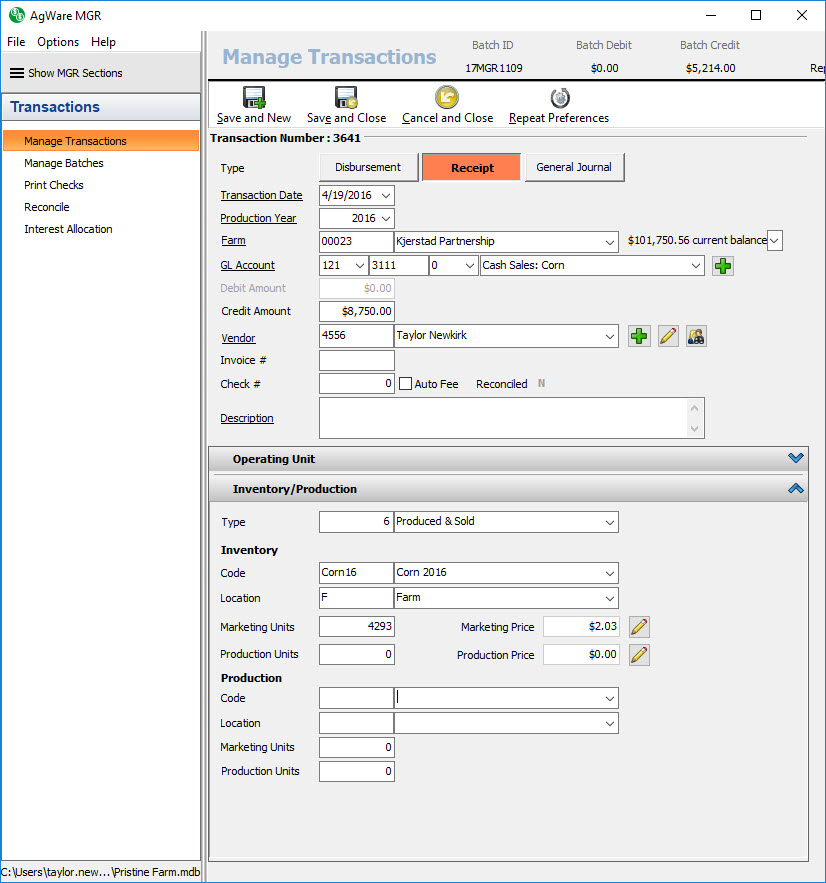
When entering inventory transactions the first option is to choose a type. AgWare MGR provides fourteen system-defined transaction types. The type determines how the transaction affects the inventory item.
The chart below explains each type.
|
Inventory Type Code |
Inventory Type Description |
Transaction Type |
Enterprise Type |
Adjusted |
Sold |
Calculated |
|
0 |
No Inventory or Production |
N/A |
N/A |
N/A |
N/A |
N/A |
|
1 |
Harvested & Sold |
General Journal |
Crop |
Increase |
N/A |
Increase |
|
2 |
Sold at Harvest (Production Only) |
Receipt |
N/A |
N/A |
N/A |
N/A |
|
3 |
Fed (Inventory Only) |
General Journal |
Crop |
Decrease |
N/A |
Decrease |
|
4 |
Seeded (Inventory Only) |
General Journal |
Crop |
Decrease |
N/A |
Decrease |
|
5 |
Born (Inventory Only) |
General Journal |
Livestock |
Increase |
N/A |
Increase |
|
6 |
Produced & Sold |
Receipt |
Crop/Livestock |
N/A |
Increase |
Decrease |
|
7 |
Butchered |
General Journal |
Livestock |
Decrease |
N/A |
Decrease |
|
8 |
Died (Inventory Only) |
General Journal |
Livestock |
Decrease |
N/A |
Decrease |
|
9 |
Destroyed (Inventory Only) |
General Journal |
Crop/Livestock |
Decrease |
N/A |
Decrease |
|
10 |
Sale |
Receipt |
Crop/Livestock |
N/A |
Increase |
Decrease |
|
11 |
Purchase (Inventory Only) |
Distribution |
Crop/Livestock |
Increase |
N/A |
Increase |
|
12 |
Inventory Adjustment (Increase) |
General Journal |
Crop/Livestock |
Increase |
N/A |
Increase |
|
13 |
Inventory Adjustment (Decrease) |
General Journal |
Crop/Livestock |
Decrease |
N/A |
Decrease |
Transaction type code 0 (No Inventory or Production) is used when generating transactions that do not affect inventory.
Next, choose the desired inventory code. The inventory codes are set up in the farm, inventory section. Once the inventory code is chosen, the inventory location will filter to the applicable locations for the chosen code. Next, enter the marketing units or production units. The marketing price or production price will automatically calculate based on the transaction amount and the total units. The price is the total transaction amount divided by the units. If necessary, you can override the price by clicking on the pencil button.
Once the batch containing the inventory transaction(s) is posted, the Farm, Inventory totals will be updated.